The workflow that kept catching us out
A lot of our work at Gravitas ships in more than one language. The English version gets built first, gets reviewed, gets signed off. Then someone has to make the Arabic one.
That last step kept eating our weeks.
Translation itself was never the issue. A designer would send the copy to localization, get the Arabic back in an afternoon, and have it sitting in their file by end of day. Then they'd open Figma to actually build the Arabic screens - and lose most of the week.
Headers had to flip. Auto-layouts had to reverse. Padding moved to the wrong side. Some icons needed to mirror, others didn't. Logos were a problem of their own. The Arabic copy was sometimes longer than the English, sometimes shorter, which changed component widths and kicked off a chain of small adjustments that didn't really end. By the time the Arabic version reached the client, one or two weeks had usually passed. Any feedback meant another round of mechanical rework.
Now multiply that by forty screens. Then by every iteration before launch.
What was actually broken
The longer we sat with it, the clearer it got that this wasn't an "Arabic is hard" problem. The tools we use every day were built English-first. Right-to-left was an afterthought, bolted on through workarounds - not part of how any of them think.
That shows up in places that have nothing to do with translation:
- Our clients want to see the Arabic version early. They're often launching into a market where Arabic is the primary language, not the secondary one. The traditional workflow doesn't let them - Arabic always trails English by weeks.
- Designers spend a meaningful chunk of their time on tasks that aren't really design. Flipping icons. Re-aligning padding.
- Developers receive two files that should be the same product but slowly diverge. More to maintain. More places for bugs to live.
- Arabic-native design talent is genuinely scarce. The people who do this work well are in high demand. Most teams don't have one in-house.
None of those problems get solved by a smarter AI translator. They get solved by rethinking the step where the work happens.
What we wanted instead
Designers should spend their time on design, not on flipping geometry. Clients should see the Arabic version in the first review, not the fourth. Developers should get one clean file, not two diverging ones. Localization should cost less and take less time for everyone in the chain.
So the plugin came together around four ideas. We didn't start with these as a list - they showed up over time as we kept making the same kinds of decisions:
- Get it right at the start. Mirror the layout, translate the copy, protect the things that shouldn't move - in one pass, in seconds. Not a multi-day cleanup after a multi-day translation.
- Hand the time back to designers. The plugin handles roughly 95% of the mechanical work. What's left is the 5% that actually requires a designer's judgment - tone, dialect, brand fit, the one-off layout call. That's the part we want them on.
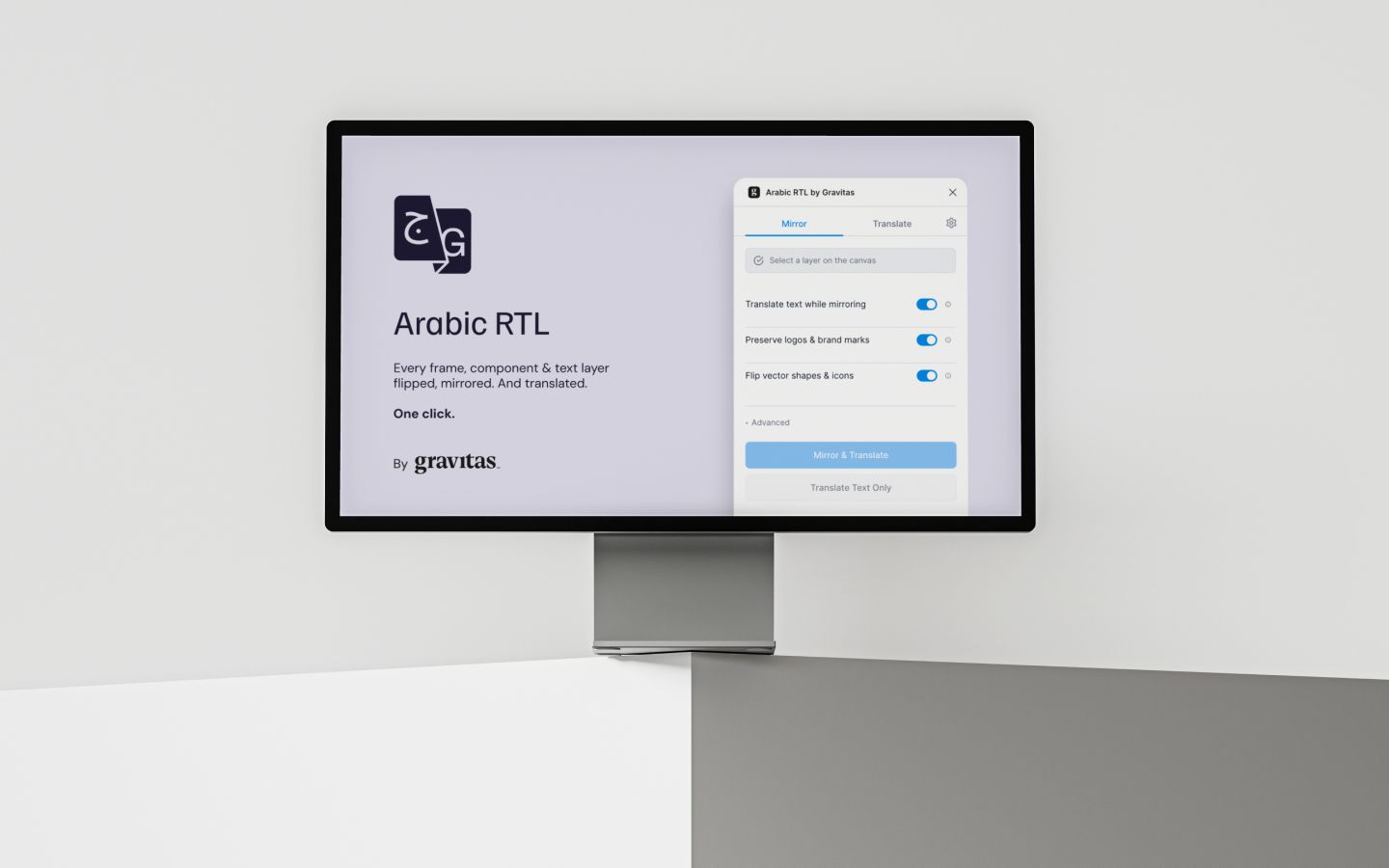
- Keep it simple, even if it's v1. Three toggles and a button on the main panel. Settings sit behind a gear icon for the people who need them. If you need to read instructions to start, we got something wrong.
- Make it part of how we work, not a side experiment. This isn't a one-off built for one project. Our team uses it on real client work now. Arabic shows up in the first round of reviews. Developers get a single source of truth. The localization step stops being a separate phase and becomes something a designer does mid-iteration.
What changes when this is in your workflow
A designer selects a frame, clicks Mirror & Translate, and five seconds later there's an Arabic version next to the English one. Layout flipped. Copy translated through whichever AI engine they prefer. Brand voice honored. Logos and brand marks left alone. They review the result, make their judgment calls, and move on.
A screen that used to take one hour now takes the time it takes to click a button.
The downstream effects are the part that really matters:
- For our clients, the Arabic version is in the first review. Content and layout issues surface weeks earlier. They pay for the design work once, not twice.
- For our developers, the handoff is one consistent file structure across both directions, not two divergent ones that someone has to reconcile.
- For our designers, the hours that used to go to padding and icon-flipping go back into design. Which is what we hired them to do in the first place.
Try it on a file you already have
The fastest way to feel the difference is to open an existing English file, install the plugin, and run it on a single frame. Watch the screen flip in under two seconds. Try a different dialect. Paste in your brand voice doc and run it again.
No account, no signup. Bring your own AI key, or use Google Translate keylessly for a first run.